
The RF Organiser
Import. Match. Generate. The professional RF frequency management tool for Wisycom and Shure users in live production — from coordination data to transmitter-ready files in minutes.
Version 3.0.0 — Apple Silicon (ARM64)
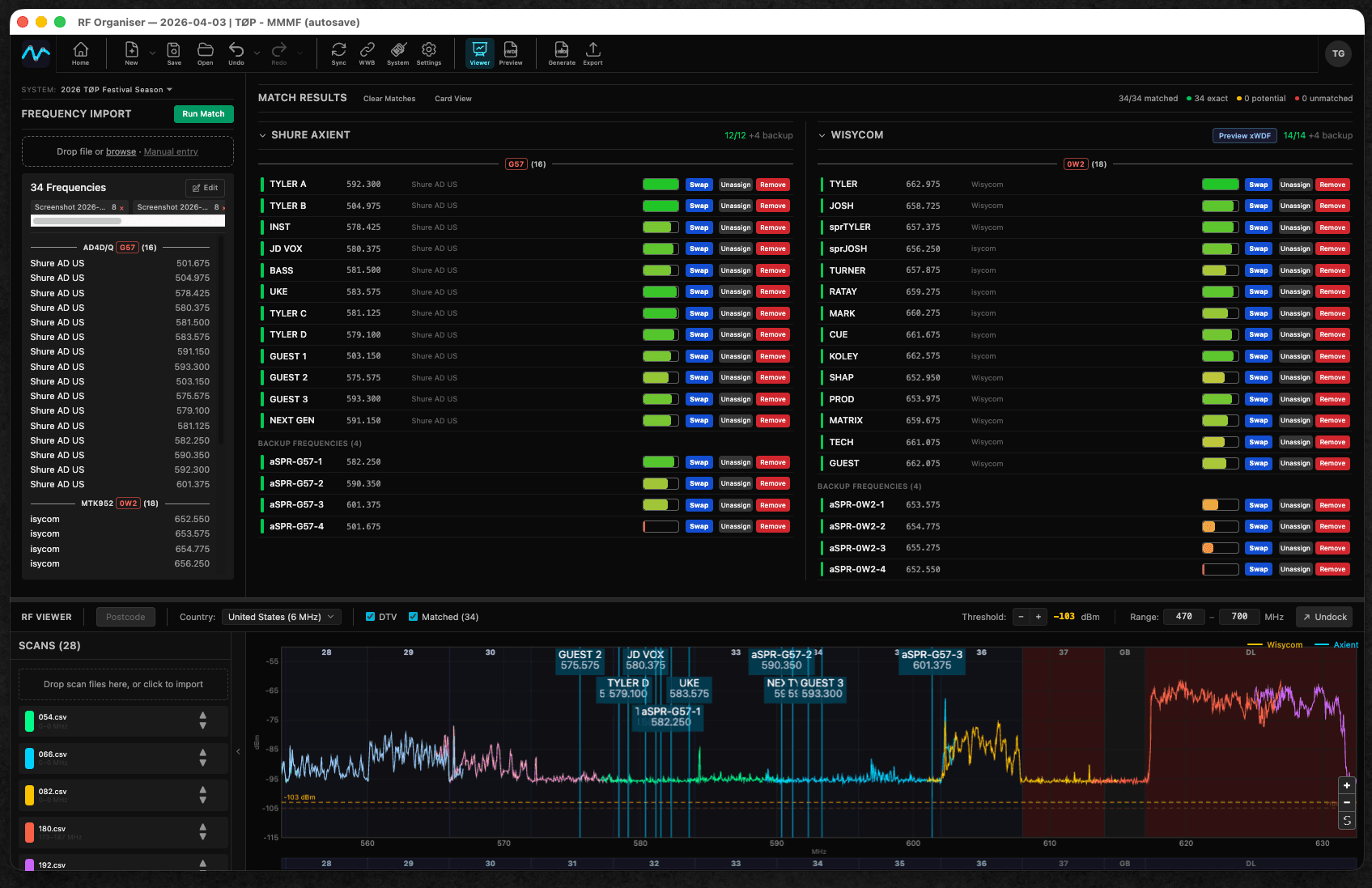
From Coordination File to Transmitter — In Three Steps
No more manually entering frequencies. Import your coordination data, let the matching engine do the work, and generate files ready for your Wisycom and Shure rigs.
1. Import
Drag and drop SoundBase CSVs, Wireless Workbench PDF reports, CWS workspace files, or even screenshot images for OCR extraction. Multiple files combine into a single frequency pool — or enter frequencies manually.
2. Match
The two-pass matching engine links frequencies to your devices using exact and fuzzy name matching. Confirm, dismiss, or manually assign — with full undo/redo at every step.
3. Generate
Export Wisycom .xwdf files, Shure CWS workspaces, or CSV frequency lists. Generate files ready to load directly onto your transmitters and receivers — no retyping, no mistakes.
Built for RF Professionals
Every feature designed around how RF coordinators actually work on tour
RF Scan Viewer
Visualise your RF spectrum environment with a dedicated scan window. Import scans from PSA3605, Shure SDB/SDB3, Sennheiser WSM, Wireless Workbench, and more. Overlay your matched frequencies and drag-to-swap assignments visually.
Two-Pass Matching
Exact matches auto-confirm on the first pass, then fuzzy matching catches near-misses on the second. Green for confirmed, amber for review, red for unmatched — manufacturer-aware filtering keeps Wisycom, Axient, and PSM devices separated.
Systems & Shows
Build your wireless rig once as a reusable System with Wisycom, Shure Axient Digital, and Shure PSM1000 IEM sections. Then match frequencies per venue as a Show — your device setup carries across the tour with cloud sync and auto-save.
Validation & Conflict Detection
Auto-detect duplicate frequencies, out-of-range assignments, off-step frequencies, and device name conflicts. Band range validation for Wisycom (5 kHz step), Shure Axient (25 kHz step), and PSM1000 with customisable band ranges.
Inline Editing
Click any matched frequency to edit it directly. Fix off-step or out-of-range frequencies inline during import. Enter frequencies manually when you don't have a coordination file yet.
Flexible Export
Generate Wisycom .xwdf files, Shure CWS workspaces, or CSV frequency lists with band selection and per-device-type separation. Choose exactly what you need for each show.
What It Works With
Wisycom
- MTK952 rack-mount
- MTK982 rack-mount
- .xwdf frequency plan export
Shure
- Axient Digital AD4D / AD4Q
- PSM1000 IEM transmitters
- CWS workspace import & export
- Mixed rigs in a single System
Import Sources
- SoundBase CSV exports
- Wireless Workbench PDFs
- Shure CWS workspaces
- xWDF frequency plans
- Image OCR (screenshots)
- Manual frequency entry
Regional DTV Channel Overlays
See exactly where your frequencies sit relative to local TV broadcasts with overlays for Americas, Europe, Japan, and Australia. Zoom, pan, and toggle overlays to plan around interference.
Scan Format Support
Import RF scans from PSA3605, Shure SDB/SDB3/SDB2 (binary and XML), Sennheiser WSM, Wireless Workbench CSV, and Freq2D formats. Drag and drop straight into the scan viewer.
Ready to organise your RF?
Download free for Mac or Windows. No account required.
v3.0.0 • macOS (Apple Silicon) • Windows (64-bit)